It’s raining man!

Today I’ve focused on conducting another experiment. While playing a game (Horizon Zero Dawn), I’ve came across the rain. It would add some more realism to the level and make it slightly stand out from the normal, sunny environments. As my project takes place in a rainforest (RAINforest), this is a pretty obvious choice for the weather. The plants always need more water than normal ones, so this would be a perfect condition for them to grow as big as I want them to.

I’ve made this experiment in the exactly same Unreal Engine 4 file as before (inventory). Any of those experiments didn’t get in a way with another, so it was completely fine. This experiment was supposed to give me an idea of how to make a realistic rain effect for the rainforest environment. I’ve fallowed a YouTube tutorial by Dean Ashford (link in the reference list).

The particle inside the UE4

The actual particle effect was made from two simple emitters. Setting up each of them didn’t took long, and I managed to get the effect right.

Although the rain was working, I was slightly disappointed by the final effect. The realistic rain wasn’t as realistic as expected and the splashes on the floor were only limited to one specific height location. This is a huge disadvantage when it comes to the realistic terrain. However, the entire experiment didn’t take long. I may repeat the experiment in the future and try out different technique to be able to maintain different heights of the terrain.

This also have another huge downside: the rain was running INSIDE THE BUILDING. this would have to be fixed in order to work in my own level. I may try to place my rain in the areas where there is no buildings or figure a way out to block the rain inside the buildings by adding additional hidden geometry (however, this may not work at all).

REFERENCE LIST:

Dean Ashford, (2017), UE4 – Tutorial – Simple Rain Particles, Available at: https://www.youtube.com/watch?v=Qmb2FrFunME (Accessed: 23 April 2019).

Height Map

This is an important experiment for myself, as I really want to make a real world location as part of my level. This technique could improve and speed up my process a lot!

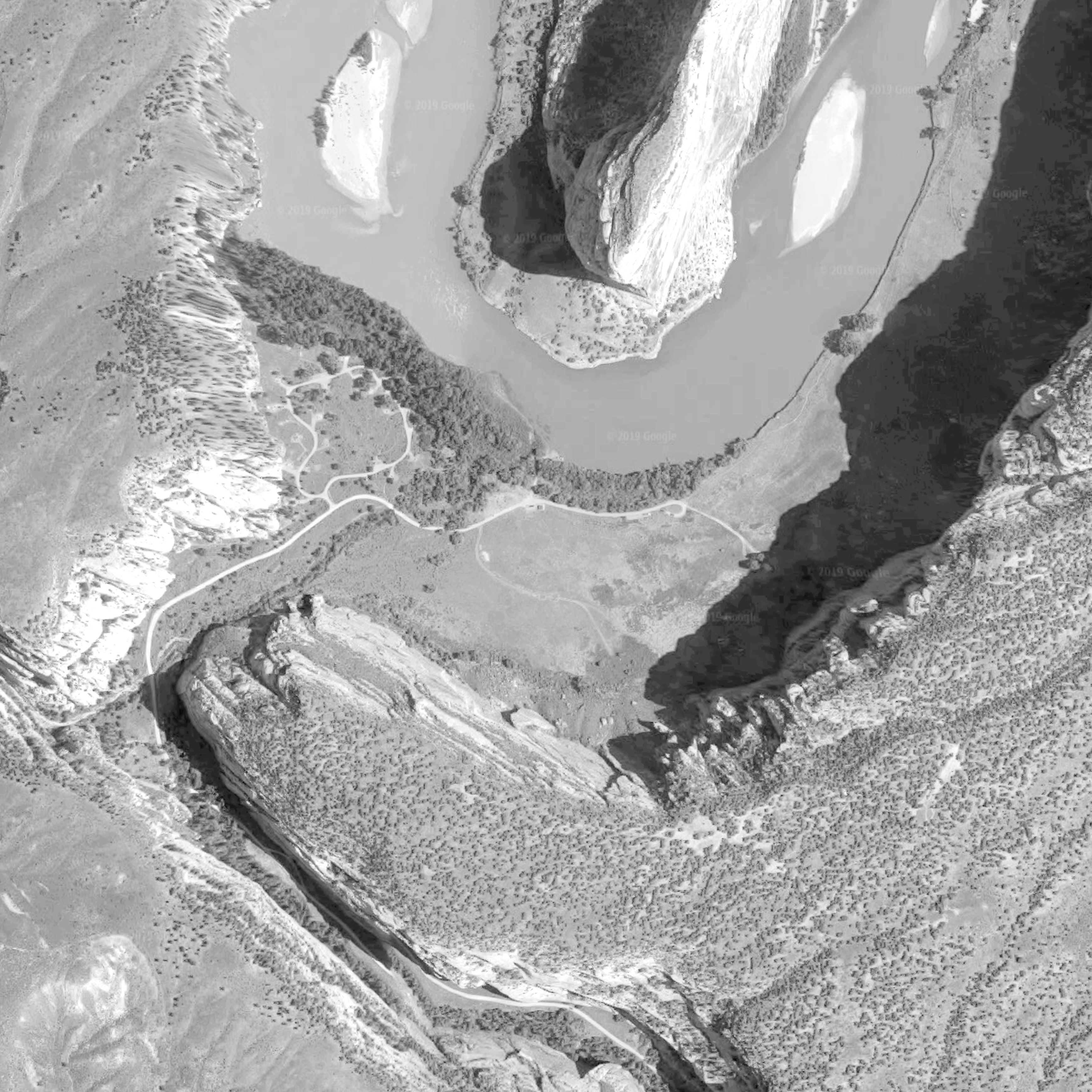
Google Earth image of the area of interest

I was using Photoshop to edit my image and I was fallowing the tutorial (link in the reference list). The video contained information about how to create height maps, but they were some sort of different type of maps. I needed an image that would be good enough to create an entire terrain, detailed enough to give the levels, but not too much for the terrain to appear pointy in flat areas. Unfortunately, I believe that the Google Earth image has shadows, which would make a problem for the software to make a proper terrain.

The final Height Map created in Photoshop

I was so hyped to do it, that I didn’t spent enough time to edit the actual Google Earth image, which resulted in a very disappointing terrain.

Because I’m completely not experienced with height maps, my texture generated in Photoshop wasn’t clear enough to give me a nice result. The imported level become a huge mess with many pointy geometries. The actual terrain wasn’t even in a similar shape as the real one in Google. This method completely didn’t work for me.

However, I’ve heard about a specific software that generates height maps (especially from Google Earth screenshots), so I may consider buying a licence and experimenting with it again in the future. For this specific project I probably won’t be using this technique anymore, as this will require lots of research and experimenting and may affect my time management.

REFERENCE LIST:

Google Earth, (2019), Dinosaur National Monument 40°31’13.8″N 108°59’30.6″W, elevation 200M,  3D map, [Viewed: 12 April 2019]

Inventory (pick an item)

Today I’ve deiced that I need to make a small experiment if I want my game to fulfil the requirements that I came up with. This is very technical part of the project, but would be very important.

For the purpose of this experiment, I’ve found a perfect tutorial that I’ve fallowed (link in the references section). The tutorial helped me to produce a working inventory with the assets floating in the level. I’ve only experimented with one item today, but I would like to add more in the future, as my collectables list is long and diverse. Although I only have one item so far, I’ve already prepared an inventory for 5, so the actual blueprint has space for more than one item in the code.

I’ve also made a model of a pick up item (fruit). First I though it would only be used in the experiment, but now I’m quite happy with it, so I may use it in the final level. However, it still needs to be textured.

Model of the prehistoric fruit (564 tris)

The fruit is slightly high poly, but I want to make my level a really detailed one. The leaves on the top will be alphas, but I’ve already implemented some ripped leaves into the model itself. This may add a small variety in the repetition of the leaf.

REFERENCE LIST:

Virtus Learning Hub / Creative Tutorials, (2016), Introduction & Setting Up Hunger System -#1 Creating A Survival Horror (Unreal Engine 4), Available at: https://www.youtube.com/watch?v=wJJn9igmznc&t=16s (Accessed: 17 April 2019).