I’ve been working on creating more assets. The result is satisfactory as I’ve manged to have several new ones that are connected to dinosaur eggs. I’ve decided that general lab assets may not be good enough to get the connection of what my level is all about, so creating the assets around the idea of experimenting on dinosaurs felt right.
Dinosaur egg in incubator or containerEgg Incubator with shelves (Tris: 418, 12244)
The next step will be to actually produce the actual room shapes and interior main points, as I’ve produced some assets that need a proper space to occupy.
This time I was working hard on some most important assets for the labs, which are desks, screens and lamp.
Lab Desk 1 (Front & Back; Tris: 440)
Lab Desk 2 (Tris: 1341)
I’ve made two slightly different desks, that will be placed all over the labs. They are different length and have different purposes: office desk and working area desk. The second one is much more detailed and has a sink on the side as many labs usually have.
Old Screen vs. New Lab Screen (Tris: 400, 480)
I’m really happy with the design of this screen. It is similar to the old one, that I’ve used in a shed, but looks much more modern and futuristic. It’s also curved as the new technology right now, and really slim.
I’ve already created materials for both of those assets and decided on some of their main features (touch screen desk).
I will be adding some liquid splashes as decals to those desks, to make them used and not as clear as they are now. The final materials are still not made (the black is basically placed everywhere).
Screen Material in UE4.
The last thing I’ve made today was the floor lamp. I wanted it to looks like a DNA chain, but I think I may edit it a little bit more (add several horizontal lines between those outlines).
Lab Floor Lamp (Tris: 1228)
If I’ll decide to make it a big asset (which I’m considering right now), I may actually turbosmooth those curves to get a much smoother effect, but so far I’m not gonna change it. It will be roughly a human size, so I guess it should looks smooth enough.
I was so excited to start working on the labs and I’ve made the first assets that are the most recognisable as lab objects – flasks. Not much to say, but I’ve wanted to create several different shapes in order to get a variety of them. I’ve also made the double sided geometry to get the better effect for the glass in UE.
Set of lab flasks
Some of those assets are quite high poly, but all of them will be placed in several different places and in different sizes. That’s why I’ve decided to do not lower the geometry. They are also double sided and round objects, which adds to that tris count and I can’t do anything about it.
I could have made several more complicated shapes flasks, but I’ve decided that those simple ones will work well enough for their purpose.
You may noticed that already, but I’ve reused several parts of my previously made assets (drone, desk lamp). I’ve edited them slightly, so they no longer looks like the original items there were before. Now they are all unwrapped and ready to be placed in a UE.
Today I’ve came up with the final assets for the shed. I’ve a perfect idea of what to place in the centre area of it so it will looks natural and properly occupied now. A set of gardening tools – wheelbarrow, shovel and soil bags. These are definitely the last assets made for this area and from now on I’ll be 100% focused on the lab assets. I’ll still have to make the materials for most of the assets so far, but I can now produce the lab objects.
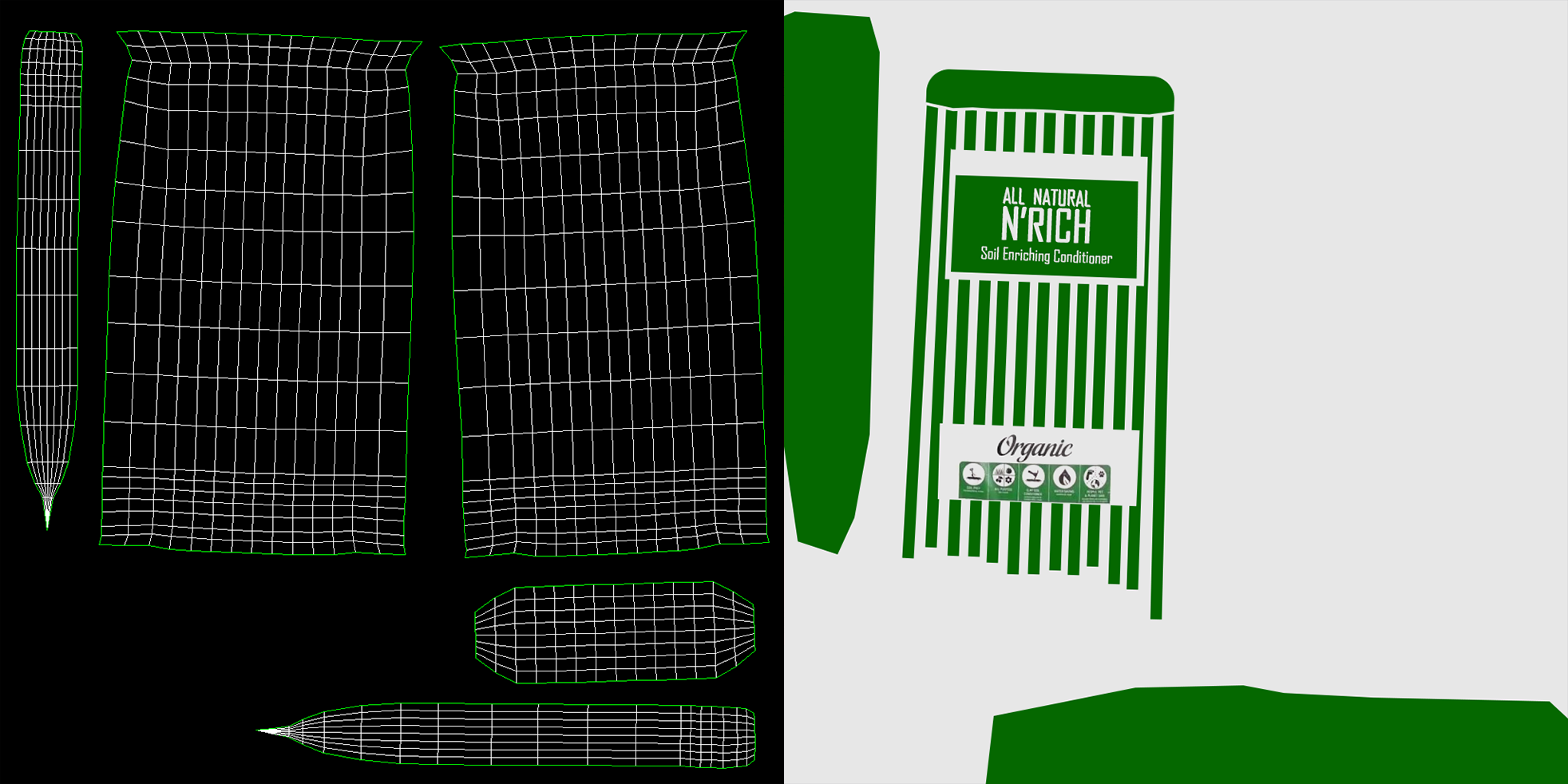
I’ve decided to make the soil with a use of a cloth modifier. While creating a duvet I’ve used several different settings to get things right and I get used to the cloth modifier. I though it will be much easier and quicker, but I had to change settings several times and experiment with the placement of the model. At the end I’ve get the wanted result, but I’ve spend longer that I should.
I was happy that I’ve unwrapped the asset before I’ve started to modify it with the cloth settings, because I have a clear UV map which fits perfectly after it’s deformed. I have already made a texture for it as well.
Soil bag UV and texture (512)
I know that I should probably unwrap the sides as well as back and the front on the same spaces, but I’ve planned to make a different texture on each side. At the end, I’ve only made the front texture as different than the others, but that’s enough for now. I may come back to it later and edit it, but I like it how it is.
Although I know that the soil bag has slightly too much geometry, it looks perfect at the end.
Today, I’ve also been working on the lightmaps resolution for the final outcome. However I think ,that I’ll need to redo the lightmaps entirely (because I have many problems after the build), so I’ve pretty much wasted the time to do all of the settings. I’ve wanted to see if the errors will still appear after the lightmaps set to the proper values, but it did, so I need to redo the lightmaps completely or find another solution. I am not sure why I’ve done it at this point, as I should leave it for the end errors and bugs check…
Lightmaps resolution view in UE4.
I still have some bits that are not working properly, so I’ll have to redo them manually at some point. In some areas I’m not sure why, so I’ll have to find that out as well.
Some while ago I’ve made a small power box with the cables that is placed on the wall. It’s a simple asset that I’ve partly reused today to create another one.
Power Box (Tris: 2624)
However the asset is a bit high poly, I’ve reused entire thing in the power generator as I really like the look of it.
Power Transformer (Tris: 23680)
Although I’ve tried to make the power generator as low poly as I can, it still has a lot of geometry. I can’t get any lower (maybe I could only delete the cables from the power box, but it won’t change much), as it’s still a pretty simple, boxy shape. The most expensive parts are on the top area, where I’ve had to copy the same, round shapes several times. I still believe it will be good enough to be placed in a real game, even with the final high level of geometry, as it is a big asset which require to have all of those details.
To go along with it, I’ve also made a separate power towers, that will be connected to the generator by cables. I’ve made these out of the image reference that I’ve seen somewhere on the google. This is how those things works to provide power to the nearby buildings.
Power Tower (Tris: 2384)
These are quite high poly as well, but I don’t think there will be any other way of getting those details in.
At the end of the day, I’ve also made 2 more assets that are for the area outside: fence doors and the doorstep that will work as a locker for the doors as well.
I’ve divided it into parts for the purpose of explaining it in here. The red area will be transparent, but some of those parts will be solid colour as well (that’s why there is some more geometry than required). The blue parts will be lit by the emissive, so they will somehow suggest there is some energy going on through them. I’m planning to use the same material as for the fence to be getting through them. I also plan to make similar doors for the lab interior and main doors as well. I will be editing them a lot (for the main entrance), but this is a base for not only one door, but many different ones.
This is it! That’s all I want to make for the shed internal and it has to be enough to make it looks good. I won’t comment on them as much, because it’s just assets creation, so there is nothing to say really.
Old Fashion Chair (work in progress)
First, I’ve wanted to create an old fashion chair, so I’ve started to work on it, bu I’ve quickly abandoned this idea. I just simply didn’t like the outcome, so I’ve looked at the modern chairs online and decided to make much more modern one.
Final Modern Office Chair (Tris: 7592)
In a few days of work, I’ve also managed to create several different assets:
Cacti (T:1670), Photo Frame (T: 128), Map (T: 54), Ashtray (T: 1349), CB Radio (T: 2486), CB Mic (T: 6753)
Board (Tris: 884)
Drawers (Tris: 1120, 892)
Shelve (T:540), Flower Pot (T: 1550, 1582), Jar (T: 660)
All of those assets have been created in several days (20.06 – 22.06), but I’ve decided to place them into one post. I don’t think any of those assets require any more comments. I was working hard for few days in a row, and all of that is my final work.
In a meantime, I’ve also made a small pieces of a cut wood, that I’ve places all around my shed, to give it a nice feel of an area being used.
I think that the shed is finally over and finished. Although I still feel like there should be something right in the centre, but I don’t know what else I could place in this area. If a good idea will came to my head, I may add something to it, but by thinking about the time, I will be moving on to the Lab facility since now. No more coming back to this (except the textures and materials).
When you think about the radio tower used in a field for a communication, you think of an old, rusty, tall, metal tower. I wanted to have something much more modern and common, so I’ve decided to have a round, hologram radio tower. This idea just popped into my head randomly after making the fence and looking at many google images of a radio tower.
LEFT: A base spine of a Radio Tower, RIGHT: Final model with the hologramic cover (Tris: 6302)
The radio tower itself, didn’t took me as much time and unexpectedly doesn’t have a high tris count, but creating several different parts that will fill the top of it, did. In total, I’ve spend entire day working on the radio tower and its parts, but I think it was worth the time.
Modular Parts of the Radio Tower
I know that most of those parts won’t be much visible from the bottom, but I wanted to give them enough details to at least looks good even in the close up. I’ve also made several versions of a disc just because it will looks more natural to have a small variety. Each part perfectly fit the shape of the radio tower, so there was no problem placing them around.
The final look of the Radio Tower in UE4.
I’ve used similar material as for the fence, but this time, there stripes that goes up, are much bigger. I’ve also added another layer of stripes on top of that to create an even more interesting effect.
The radio tower looks so huge now, but there is no trees that would surround it just yet. The trees themselves will be really huge as they usually are in a rainforest, so the proportions of the tower should work pretty well. If not, I can always make it a bit smaller at the end.
Today I was working on completely random items, but I’ve managed to made quite a few big and important ones. I’ve made another desk, as I felt like the shed interior is still empty. I’ve decided that I’m gonna make another desk, this time more like a sitting area with a chair and PC.
Desk (Tris: 1167)
It also has an open drawer and will have something inside to make it looks more realistic. It also will be a place, where I’ll put a very important item for the gameplay – a map. I want the player to be able to find it in the game and use it to find their way around. The area itself is not gonna be as big, but a map may help to orientate in the space.
The rainforest area isn’t just a shed, so I’ve made a fence that will be placed all around the lab area. It has few different parts that now I’ll be able to make a proper fence. It’s again a modular design, as I still don’t know the exact placement of the fence.
Different Fence Parts (Tris: 492, 9922, 18458, 5305)
The fence is a high hologramic fence, that is suppose to keep the dinosaurs out of the lab area for safety. It may be switched off at the beginning and the player may want to turn it back on again during the gameplay, so I’ll have to learn how to make it work.
Although it’s slightly high poly, I believe it’s the absolute minimum that’s needed to make it looks god. I’ve also already unwrapped it and placed materials onto it, so it starts to look pretty good.
Today I was working on something completely different. I’ve had a great idea of what I want to include on the interior of the LAB, so I had to focus on this asset today.
It is suppose to be a hologram of the Earth with the information of its current state. The dinosaur spices count, the population etc. I wanted it to looks real as a hologram of current planet state (day and night circle as well), but I’ve decided to only go for rotation and moving clouds. Preparing everything from a scratch took me entire day, but it was worth it! I love the final result and it will add a lot to the interior of a lab.
Hologram Globe with Stand (Tris: 10792, 2978)
The actual asset is quite big in a game, so I went for a quite high tris count. I had to copy the planet’s sphere three times and place it inside each other to get the final effect (each one for: clouds, base planet, internal planet). I had to experiment with it several times, as I wanted to be able to see the hologram from the inside as well. It required an additional sphere to be placed inside. There may be another way of doing so, but I don’t know any other way around it.
I’ve used a free texture from a real satellite and manipulated it to get the final look of the futuristic planet Earth. I wanted to distort the current look of the continents, as currently everyone talks that in the future, most of the land will be flooded by water. That’s why the planet looks a bit different than right now.
The final hologram inside UE4.
The bigger challenge was to create the visuals of the rays that are getting from the stand to the actual hologram. I had to make an additional geometry and texture it separately to get the effect. I believe it works well at the end.




 Raptor's Rage