I’ve decided that at this moment I really need to have a dinosaur in my level. I’ve been using ZBrush before, but this time I’ve decided to create a base for the design inside the 3DS Max and then move into adding more details in this software. I find this way easier and quicker to get to the final wanted shape.
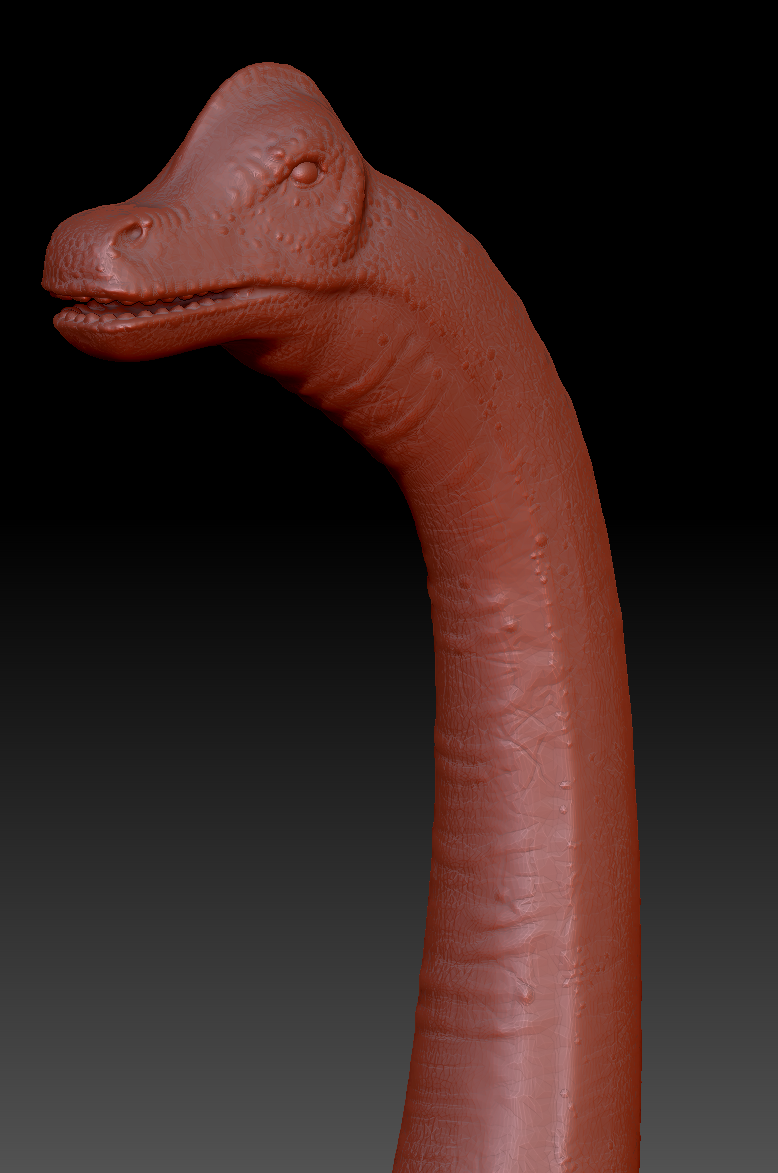
I was working on it for two days and finally finished it with the details that I think will looks great in the final scene. The dinosaur would be huge, so the details of the head won’t be as visible to the player, but I’ve decided that I still want to work on it a little bit.
Finished Dinosaur in ZBrushDinosaur Head
I am really happy with the result, as I haven’t work on creature design for a long time. This is a satisfactory result as for someone who had to remind myself of how to use this software. The next step will be to retopology this mesh using a ZBrush tool, bake it down with Substance Painter and rig and animate it at the end. I hope that the other parts of it will go as smooth as this one.
Today I was working on something completely different. I’ve had a great idea of what I want to include on the interior of the LAB, so I had to focus on this asset today.
It is suppose to be a hologram of the Earth with the information of its current state. The dinosaur spices count, the population etc. I wanted it to looks real as a hologram of current planet state (day and night circle as well), but I’ve decided to only go for rotation and moving clouds. Preparing everything from a scratch took me entire day, but it was worth it! I love the final result and it will add a lot to the interior of a lab.
Hologram Globe with Stand (Tris: 10792, 2978)
The actual asset is quite big in a game, so I went for a quite high tris count. I had to copy the planet’s sphere three times and place it inside each other to get the final effect (each one for: clouds, base planet, internal planet). I had to experiment with it several times, as I wanted to be able to see the hologram from the inside as well. It required an additional sphere to be placed inside. There may be another way of doing so, but I don’t know any other way around it.
I’ve used a free texture from a real satellite and manipulated it to get the final look of the futuristic planet Earth. I wanted to distort the current look of the continents, as currently everyone talks that in the future, most of the land will be flooded by water. That’s why the planet looks a bit different than right now.
The final hologram inside UE4.
The bigger challenge was to create the visuals of the rays that are getting from the stand to the actual hologram. I had to make an additional geometry and texture it separately to get the effect. I believe it works well at the end.
Today I’ve finally finished all the walls required to make a shape of my shed. This is looking good and I’m happy to see it coming together pretty well.
Shed side walls (external and internal view of the same assets; Tris: 458, 467)
I had to make two different side walls for the different purpose. One of them is suppose to cover the side entirely as an end wall, while the other one has a place for the open door to allow player to get inside. Both of them are similar and were unwrapped in the same way (with some small changes). So far it all fit perfectly with the rest of the shed so I’m really happy with the result.
The next step will be making the actual doors and windows, so it will looks more liveable. I would also want to make a quad and place it inside the second room (garage), as the person living in there would be responsible for keeping the area in a good condition (maintenance).
As I have already mentioned, I want this shed to be liveable, so it has to looks like an occupied area. The first idea was to make a BED for the person who lives in there. It’s again, simple but good looking bed. I’ve seen many similar ones in a shops now. The modern beds are simple with straight lines, so that’s what I’ve went for with this one.
I had multiple attempts to make a bedding. I even tried to model it by myself, but I’ve finally resigned. Eventually I’ve used a cloth modifier to make a nice looking duvet that covers the bed.
Multiple bedding tries (my own modeling on the left).
After making several different duvets, I’ve noticed that the main issue is that the bed doesn’t have a pillow yet. I’ve made a pillow first then I was finally able to make the final shape of the duvet.
Final bed without and with bedding (Tris: 276, 5954)
I have decided that if I’ll go for a simple shape bed, I may add slightly more geometry for the actual bedding. The total tris count isn’t even that high, so I’m eventually happy with it. I have to say that it took several tries, to get it into this shape! I was working on it for most of the day, trying it out multiple times with different settings for cloth.
At this point I’m happy with the final look of it. The bed looks like it’s been used before, so it convey the right message. I decided to delete some geometry in the invisible areas, so it slightly reduced the final amount of tris. I have decided to leave the bed details under it, as I’m planning to use it several more times that those details may be visible to the player (bed without a mattress).
Deleted geometry (TRIS REDUCTION from 4848 to 3758)
I could probably delete many others, but I wanted to be sure, that the player won’t see the inside of this duvet. I’m quite happy with the final tris count, so I’m gonna leave it as it is now.
This was a different type of experience, as I haven’t done much cloth work before (only few times). It took me longer than expected, so I was only able to finish the bed today. I’m still happy with it, but I could have make some more assets instead (or more different versions of the bed) if I would be more experienced with the cloth modifier.




 Raptor's Rage